CollectHub - Collection Sharing Platform

v1.4.0 · Community · Free
🙋 リクエスト: 山田太郎
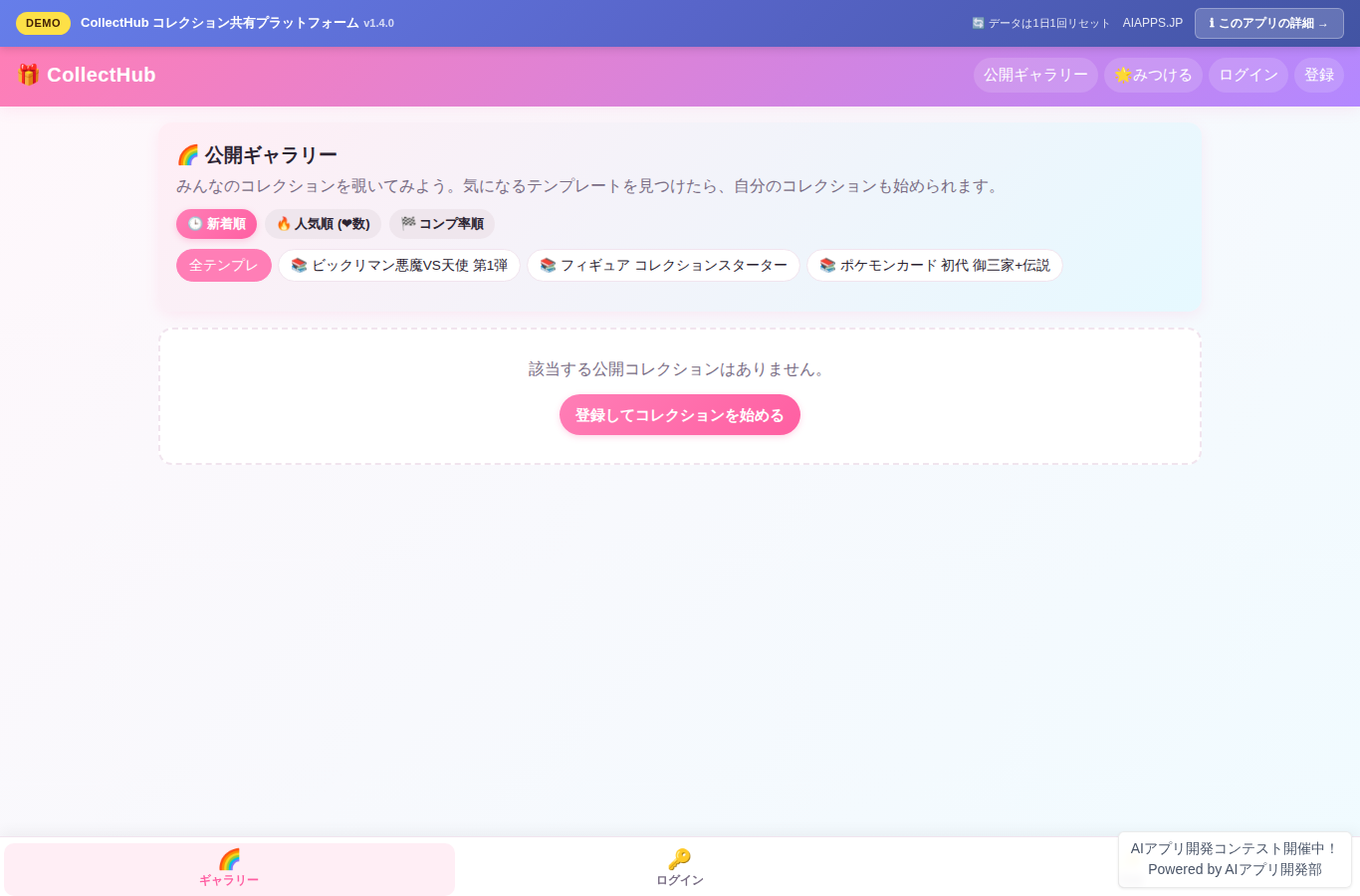
Screenshot of CollectHub - Collection Sharing Platform
App screen preview

Overview

A platform for recording, organizing, and sharing collections of any hobby—Bikkuriman stickers, Pokémon cards, figures, and more. Start your own collection from a template, check items off as owned or not owned with a single tap, and see your completion rate calculated automatically. Phase 5 completes the collector experience with recommended templates and users tailored to your activity, a statistics dashboard featuring monthly check-in trends, CSV export (full My Collection / wishlist), and customizable item ordering within collections (preset sorting plus manual reordering).
#Collections #Hobbies #Sharing #Templates #Completion Rate #Follow #Likes #Comparison #Wishlist #Trading #DM #Notifications #Search #Rankings #Recommendations #Statistics #CSV #Sorting

Key Features

  • User registration and login (app-native accounts, email + password)
  • Collection templates (Bikkuriman Devil vs. Angel and more, bundled with numbered starter data)
  • Create My Collection from a template (start your own collection in one click)
  • Item check-in (toggle owned/not owned with one tap)
  • Automatic completion rate calculation and display (progress bar + achievement %)
  • Item photo uploads (up to 3 per item, JPEG/PNG/WebP, 5MB max)
  • Item detail editing (rating, condition, purchase price, purchase date, notes)
  • Public gallery (viewable by anyone without login; sort by newest, popularity (❤ count), or completion rate; template filter) (Phase 4 expansion)
  • Toggle collections between public and private
  • Switch between grid and list views
  • Template directory (create and add your own new templates)
  • User follow / follower system (Phase 2)
  • "Like" (favorite) collections (Phase 2)
  • Favorite collections list (Phase 2)
  • Collection comparison view (filter by yours, theirs, shared, or theirs only) (Phase 2)
  • New activity feed from users you follow (Phase 2)
  • Follower, following, and received ❤ counts shown on user pages (Phase 2)
  • Wishlist (register and manage wanted items by template) (Phase 3)
  • Trading board (offering/seeking, filter by template, toggle active/closed) (Phase 3)
  • Match display (automatically flags matches when another user's offer is on your wishlist) (Phase 3)
  • Direct messaging between users (for trade negotiations, with linked trade display) (Phase 3)
  • Unread DM badge (unread count in header/tab bar) (Phase 3)
  • One-click wishlist add and offering/seeking posts from item details (Phase 3)
  • Notification center (follows, ❤, DMs, and wishlist matches aggregated into one stream) (Phase 4)
  • Unread notification badge (header 🔔) and mark-all-as-read button (Phase 4)
  • Automatic wishlist match alerts (instant notification when a wishlist item is posted as "offering") (Phase 4)
  • DM read sync (opening a thread also marks its DM notifications read) (Phase 4)
  • Cross-search (search collections, users, and item names/serial numbers) (Phase 4)
  • Top 10 popular collections ranking (by cumulative ❤ count, with gold/silver/bronze medals) (Phase 4)
  • Top 10 active users (scored on new collections, ❤, and trade activity in the last 14 days) (Phase 4)
  • Trending templates (discover templates with the most new collections in the last 14 days) (Phase 4)
  • Gallery filters (by template; sort by newest, popularity, or completion rate) (Phase 4)
  • Recommended templates (suggested from your following activity and overall popularity) (Phase 5)
  • Recommended users (based on shared templates × follower count × public collection count) (Phase 5)
  • Statistics dashboard (overall summary + monthly check-in trend SVG chart + completion rate per collection) (Phase 5)
  • CSV export (full My Collection and wishlist, UTF-8 with BOM for Excel compatibility) (Phase 5)
  • Collection organization tools (4 preset sort options + saved custom ordering + reset to template default) (Phase 5)
  • Colorful, playful UI (fully responsive for desktop, tablet, and portrait mobile, with a bottom tab bar)

Setup Steps

  1. Create an account on AI App Lab (if you haven't)
  2. Download installer.php from your dashboard
  3. Upload to your server's public directory and run it
  4. Enter API token → select this app → enter DB info → done

📚 Version History

Showing the current version only. See all versions (5) →

v1.4.0 Current 📅 2026/09/02 · 84.2 KB
🔒 Log in and a license are required to download

⭐ Reviews

No reviews yet.