Fuse - Super SNS App
🙋 リクエスト:
おっかーつのだしおかやまけん
+ 改善: 山田太郎
App screen preview
Overview
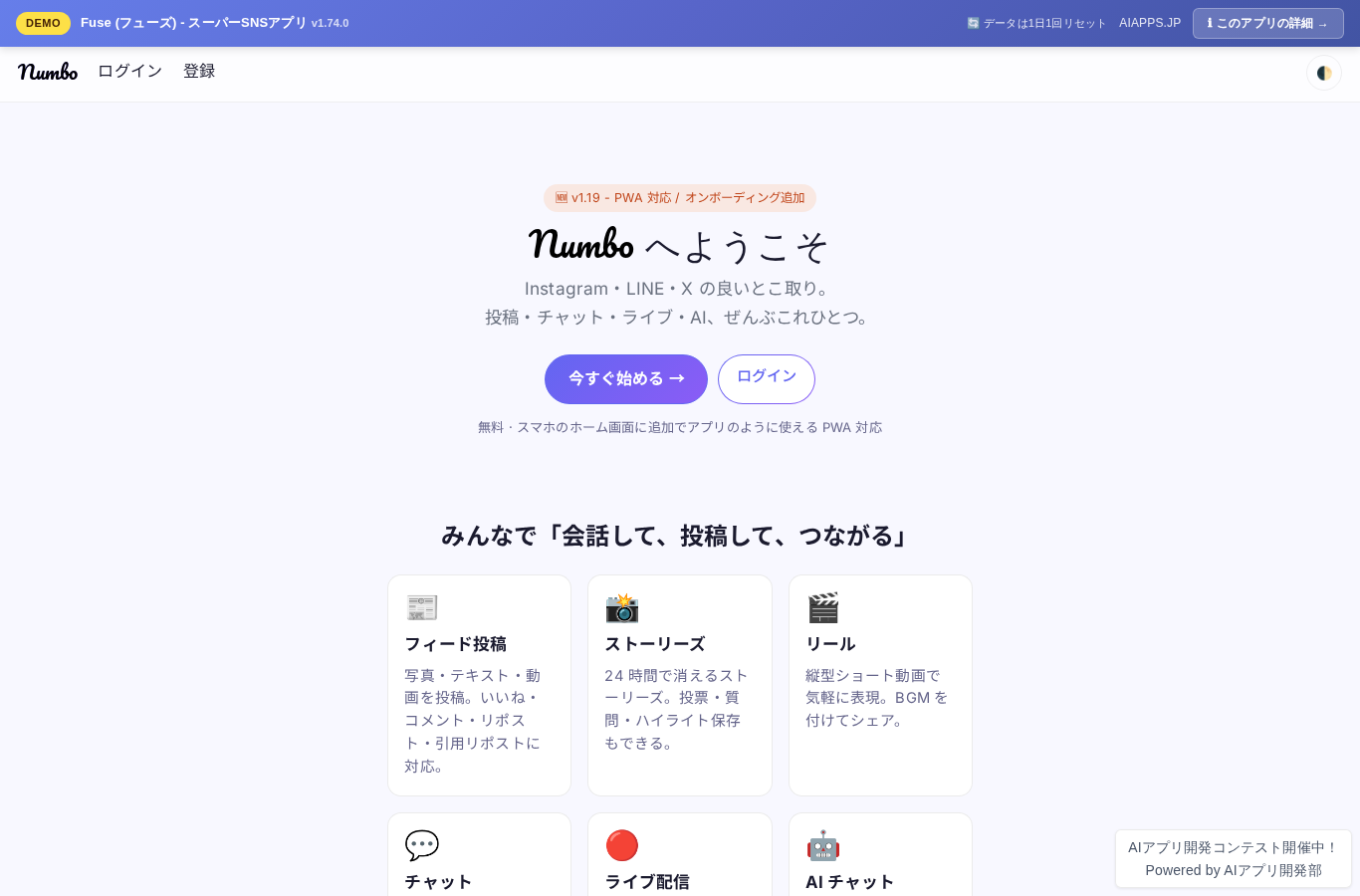
A super SNS app that combines the core features of Instagram, LINE, and X (formerly Twitter). An all-in-one, self-hosted social platform with 1-on-1 and group chat, photo/video feed posts, Stories (auto-deleted after 24 hours), short-form video Reels, likes/comments/reposts, public and private account settings, and more.
Key Features
- User registration/login with email address and password
- Profiles (avatar, bio, public/private setting)
- Feed posts (text + images/videos, up to 4 images + 1 video)
- Images shown in a grid, videos played in an inline player
- Likes, comments, and reposts
- 1-on-1 and group chat (with read receipts)
- Send images/videos in chat (lightbox view)
- 1-on-1 voice and video calls (WebRTC, using Google STUN servers)
- Emoji sticker reactions
- Hashtag extraction and search
- Follow / follower system
- Dark/light mode toggle
- Responsive UI for both mobile and desktop
- Site-wide incoming call alerts (full-screen call UI + ringtone + vibration + browser notifications)
- Notification center (likes, comments, follows, reposts) with unread badges
- Post bookmarks (saved list)
- Message unsend (chat)
- Quote replies (chat)
- Pin chats in the chat list (chat)
- Leave group chats (chat)
- Quote reposts (repost with your own comment on the original)
- Post editing (with an "edited" marker)
- Pin a post to your profile (one per user)
- Stories (image/video/text, auto-deleted after 24 hours, text and emoji overlays)
- Poll and question stickers (in-Story interactions)
- View the list of Story viewers
- Highlights (save Stories to your profile permanently)
- Close Friends list (limited Story sharing)
- Reels (vertical short-video feed, swipe up/down, autoplay)
- Reels BGM selection (chosen from the operator's library)
- Reels playback speed toggle (0.5x / 1x / 1.5x / 2x)
- Reels Duet feature (post side-by-side with another user's video)
- Reels view counts
- Text and sticker overlays on Reels
- Asynchronous chat sending (no page reload on send, auto-scroll to latest, polling for new messages)
- Map (OpenStreetMap iframe) showing your current location, opt-in location saving, approval-based location sharing with mutual followers, and a nearby-posts filter
- Always-visible chat call buttons (fixed in the header)
- More stable full-screen Reels display (handles mobile address bar resizing)
- Delete your own posts/Reels (confirmation dialog + bulk deletion of likes, comments, etc.)
- Email notifications (new chat messages, incoming calls) — sent only when the recipient doesn't have the app open, batched within 5 minutes
- Stay signed in (Remember-me) — 30-day auto-login with secure selector + validator tokens and rotation
- Log out of all devices — invalidates every remember-me token at once
- Per-type notification toggles (likes/comments/follows/reposts/mentions/chat/calls/system)
- Global on/off switch for email notifications
- Type filtering in the notification list
- Activity page (actions directed at you + actions from people you follow)
- Enhanced Discover tab (suggested users + trending hashtags)
- Improved universal search (saved search history + re-search from recent searches)
- Browser push notification permission request (desktop notifications on incoming calls only when granted)
- Mobile-friendly Web Push notifications (Service Worker + VAPID) — notifications arrive even when the app is closed
- Push notifications respect the per-type notification toggles (likes/comments/follows/reposts/mentions/chat/calls/system)
- Per-device push notification enable/disable toggle (in Settings, with help on re-enabling after a denial)
- Tapping a push notification focuses/opens the relevant page in the app (notification center/post/profile/chat)
- Automatic cleanup of expired push subscriptions (registration removed on 410/404 responses)
- Admin page (v1.6 / ?page=admin) — requires the admin flag; regular users are redirected to the top page
- Admin dashboard — KPI cards (users/posts/chats/reports/bans, etc.) + 7-day charts (Chart.js) + real-time activity
- User management — search/ban/unban/grant or revoke admin rights/delete/detail page (posts, login history, report history)
- Post management — search/hide/unhide/delete
- Report management — reports on posts, comments, users, and messages + resolve/dismiss/top most-reported users
- Announcements — create/edit/delete + display active announcements by level at the top of the feed
- App settings — app name, description, logo URL, signup on/off, maintenance mode, banned words, daily post limit
- Group management — group chat list, member counts, message counts, deletion
- Audit log — automatically records admin actions (ban/hide/delete/setting changes, etc.)
- Banned users cannot log in + login history recorded with IP and User-Agent
- v1.7 (#52): UX animations — heart pop on like, notification bell shake, chat bubble animations, page fade-in
- v1.7 (#52): Design enhancements — hover/focus styles for buttons and forms, stronger post card shadows, polished empty states
- v1.7 (#52): Utility class for skeleton loading (.fuse-skel)
- v1.7 (#52): Confirmation dialog for external links (shown before navigating away from Fuse)
- v1.7 (#52): Temporary account lock after 5 failed logins in 30 minutes (based on login_log)
- v1.7 (#52): Accessibility — respects prefers-reduced-motion (all animations disabled for users who prefer less motion)
- v1.8 (#59): Video tab — keyword search and recommendations via YouTube Data API v3, played in an in-app iframe player (playback speeds 0.5x/0.75x/1x/1.25x/1.5x/2x)
- v1.8 (#59): Video tab — "Watch Later" list (add/remove from the video detail page, browse in the video tab's Watch Later sub-tab)
- v1.8 (#59): Video tab — share YouTube videos to the feed (with a short comment)
- v1.8 (#59): Automatic YouTube URL previews in posts and chat — detects YouTube URLs in post bodies, comments, and chat messages and shows a card with a thumbnail (tap to open the video detail page)
- v1.8 (#59): Live streaming — real-time video broadcasting over WebRTC (Google STUN) (P2P; roughly 10 viewers max)
- v1.8 (#59): Live streaming — viewers can post comments (up to 500 characters)
- v1.8 (#59): Live streaming — "LIVE" badge on streaming users' avatars (pulse animation, respects prefers-reduced-motion)
- v1.8 (#59): Live streaming — "🔴 Live" button added to the navigation (browse streams + start your own)
- v1.8 (#59): Live streaming — broadcaster controls (mic on/off, camera on/off, end stream button, elapsed time, viewer count)
- v1.8 (#59): Live streaming — streams with no heartbeat for 90 seconds are automatically ended (recovery from abnormal termination)
- v1.8 (#59): Live streaming — archive list of past streams (shown on the broadcaster's page, with peak viewer counts recorded)
- v1.8 (#59): Instagram-style profile layout — header image + avatar + three counters for posts/followers/following
- v1.8 (#59): Profile post grid view (3 columns, image/video thumbnails, switchable with list view)
- v1.8 (#59): Extended profile fields — header image URL, occupation, location, birthday (visibility: everyone/followers/private), and external links (up to 10, with optional labels)
- v1.8 (#59): Profile badges — verified, OG (early user), PRO, staff, and more, managed in the user_badges table
- v1.55.2 (#277): Fixed a version update error — removed the initial-admin UPDATE statement in schema.sql (added in v1.9/#65). It ran before the MIGRATION declaration that adds the is_admin column, causing an Unknown column error on older instances (pre-v1.6) and rolling back the automatic migration. This also removes the inappropriate practice of granting admin rights to a specific external email address on a multi-tenant setup. The initial admin is now granted by the instance owner from the admin panel.
- v1.10 (#66): Added external API key fields to the admin page's app settings — the YouTube Data API key is stored and displayed masked, with a show/hide toggle and a delete button (existing settings preserved; changes take effect in the video tab immediately after saving)
- v1.11 (#68): Completely removed the News feature (News tab, NewsAPI integration, newsapi_key setting) — navigation, pages, and library functions all withdrawn (DB tables kept for compatibility)
- v1.11 (#68): Added Fuse AI chat — a "🤖 AI" tab in the navigation providing an in-app AI companion powered by Gemini (v1.12.2 / #74: uses the gemini-2.0-flash model)
- v1.11 (#68): Fuse AI — conversation history saved to the database and continued on your next login, with a "Reset conversation" button to clear it
- v1.11 (#68): Fuse AI — streaming responses (streamGenerateContent rendered in real time via SSE. v1.12.2 / #74: uses the gemini-2.0-flash model)
- v1.11 (#68): Fuse AI — shortcut buttons (✍️ Write a post / 🌍 Translate / 💡 Give me ideas / 😊 Let's chat)
- v1.11 (#68): Fuse AI — character design: friendly and approachable, casual tone with moderate emoji use, and guidance on how to use Fuse
- v1.11 (#68): Fuse AI — purple-to-blue gradient ✨ icon, gradient-background AI reply bubbles to distinguish them from user messages, in both dark and light modes
- v1.11 (#68): Fuse AI — added a Gemini API key field to the admin page's app settings (key name gemini_api_key, with masked display, toggle, and delete button)
- v1.11 (#68): Fuse AI — added a "✨ Generate text with AI" button to the post composer; enter a keyword or theme and the AI writes the post text for you
- v1.11 (#68): Fuse AI — empty-state UI showing "AI features are coming soon" when no API key is configured
- v1.12 (#67): Redesigned the mobile bottom navigation — position:fixed with safe-area-inset-bottom support, so it never shifts while scrolling
- v1.12 (#67): Mobile bottom nav — a large round "Create post" FAB in the center (6 slots: 4 tabs at the edges + center FAB + a "More" button)
- v1.12 (#67): Mobile bottom nav — the "More" tab slides up a bottom sheet with a translucent overlay, showing the remaining menu items in a 3-column grid (Reels/Video/Live/Activity/Notifications/Search/Profile/AI/Saved/Settings/Logout)
- v1.12 (#67): Navigation customization screen — a dedicated page opened from Settings for reordering the 4 main tabs by drag and drop (touch devices fall back to long-press + clone dragging)
- v1.12 (#67): Navigation settings are saved to the database (fuse_nav_prefs table) so they apply on every device you're logged in on
- v1.12 (#67): A "Restore defaults" button resets navigation settings with one tap
- v1.12 (#67): The tab for the current page is highlighted in the accent color; supports both dark and light modes and respects prefers-reduced-motion
- v1.12 (#67): The desktop navigation (.topnav) is completely unchanged
- v1.12.1 (#71): Fixed an installation failure — aligned the user_id columns of fuse_ai_messages and fuse_nav_prefs with users.id (INT UNSIGNED), resolving the FOREIGN KEY constraint error (Cannot add foreign key constraint) on new environments
- v1.12.2 (#74): Fixed the HTTP 400 error in Fuse AI chat — updated the Gemini API model from gemini-1.5-flash to gemini-2.0-flash (for both generateContent and streamGenerateContent). The API endpoint format (v1beta/models/<model>:generateContent) and request spec (contents/systemInstruction/generationConfig) already follow the latest specification and were left unchanged. Existing API key settings, conversation history, and UI are completely unchanged
- v1.13 (#73): Complete design overhaul — cinematic × minimal × stylish (Instagram / VSCO / BeReal inspired) with a neutral palette, generous whitespace, flat buttons, thin 1px borders, and no shadows. Refreshed the CSS variables (--bg / --fg / --accent / --link (#0095f6) / --heart (#ed4956) / --story-grad) with support for both dark (background #0e0e0e / cards #1a1a1a) and light (background #fafafa / cards #ffffff) modes. Typography uses Inter + Noto Sans JP (Google Fonts) loaded from the head
- v1.13 (#73): Design refresh — no changes at all to existing class names, IDs, PHP logic, data, or schema (only assets/style.css was overwritten and font loading added to the head in lib.php). Removed the flashy gradients on AI bubbles, profile headers, Live/YouTube cards, etc. in favor of a unified neutral palette. Unified the main UI — .btn / .btn-secondary / .action / .topnav / .bottomnav / .msg / .fuse-profile-* / .fuse-ai-* and more — into an Instagram DM-style minimal UI
- v1.14 (#72): 👥 Groups — create themed groups (public / private with approval / open chat), set a cover image and description, post, comment, and like within the group, join/leave, owner approval, member list, and a "👥 Groups" entry in the navigation
- v1.14 (#72): 📅 Events — create events (title / date and time / location / description / cover image, public or private), RSVP as going / maybe / not going, attendee list, reminder notifications the day before and 1 hour before the event (assumes fuse_events_send_reminders is triggered via cron or similar), shareable text for the feed, and a "📅 Events" entry in the navigation
- v1.14 (#72): 🛍 Marketplace — a user-to-user buy-and-sell board (flea-market style): list items with name / price / description / category (10 types) / image URL, search by keyword and category, contact sellers via comments, mark items as "Sold" when a deal closes, manage your own listings (My Deals), and a "🛍 Market" entry in the navigation
- v1.14 (#72): ✨ Memories — resurfaces your posts from the same day one year ago, two years ago, and so on as "Memories", listed with a year badge, with the ability to open the original post and reshare it; call fuse_memories_notify_today from cron for automatic notifications (deduplicated to once a day), and an "✨ Memories" entry in the navigation
- v1.14 (#72): No changes at all to existing features or schema — everything is added as new tables (fuse_groups / fuse_group_members / fuse_group_posts / fuse_group_post_comments / fuse_group_post_likes / fuse_group_invites / fuse_events / fuse_event_attendees / fuse_event_reminder_log / fuse_market_items / fuse_market_inquiries / fuse_market_purchase_intents / fuse_memory_notify_log) and new pages (groups / group_view / group_create / action_group_join / events / event_view / event_create / action_event_rsvp / market / market_item / market_create / market_mine / action_market_status / memories). Also supports the existing theme-light/theme-dark
- v1.14.1 (#72 / 2nd opinion): Group post notifications moved to a 'group_post' type — can be turned off in Settings → Notification settings, reducing the fan-out load of large groups
- v1.14.1 (#72 / 2nd opinion): Deferred job execution without cron — fuse_events_send_reminders (every 5 minutes) and fuse_memories_notify_today (every 24 hours) are triggered automatically with rate limiting when an authenticated page is accessed (run times stored in app_settings)
- v1.14.1 (#72 / 2nd opinion): Purchase request UI — send a "Request to buy" (with an optional note) from a marketplace listing, and view or close your purchase requests on the My Deals page
- v1.14.1 (#72 / 2nd opinion): Group invite UI — members can invite other users by handle from the group detail page, and invitees can accept or decline from the "My Invites" (group_invites) page (uses the fuse_group_invites table)
- v1.14.1 (#72 / 2nd opinion): One-click event sharing to the feed — go straight from an event's detail page to the post composer with ?body=... prefilled
- v1.14.1 (#72 / 2nd opinion): Cleaned up the redundant open_chat check in group_view.php (no behavior change)
- 📞 Call history page (lists outgoing, incoming, and missed calls; missed calls highlighted in red; one tap to call back)
- 📣 Group chat announcements (pinned for all chat participants; only the poster or the group creator can remove them)
- 🖼 Group chat album (all images and videos sent so far collected in a tab)
- 📊 Group chat polls (surveys and scheduling — single and multiple choice, with real-time result bars)
- ✅ Group chat shared to-dos (with a progress bar; any member can check items off)
- v1.16 (#79): Chat mute — silence notifications for 1 hour / 8 hours / 24 hours / forever (🔕 icon in the chat list and the in-chat header). Only email notifications are suppressed; in-app notifications still arrive
- v1.16 (#79): Online status — manually set your status to Online / Busy / Away / Offline (switched from the chat list). The other person's status dot is shown in the 1-on-1 chat header
- v1.16 (#79): Star (bookmark) messages to review later — with a dedicated starred messages page (★ Starred)
- v1.16 (#79): Message forwarding — forward any message to another chat in one click (choose from your 20 most recent chats)
- v1.16 (#79): In-chat keyword search — the 🔍 button in the chat header instantly filters the visible messages by sender name or text
- v1.16 (#79): Group chat read-by list — tap "Read N" on your message to open a modal showing who has read it
- v1.16 (#79): + menu (LINE-style bottom sheet) — one-tap access to images / camera / files / location (Google Maps URL) / polls / scheduling / to-dos / notes / contacts from the "+" left of the chat input. Amidakuji (ladder lottery) / gifts / video and BGM are planned for Phase 2 (shown as "Coming soon")
- v1.17 (#86): Chat + menu Phase 2 — implemented the 4 features previously marked "Coming soon": Amidakuji (ladder lottery) / gifts (marketplace listing sharing) / YouTube video sharing / BGM sharing. All implemented with new tables (fuse_chat_share_cards / fuse_chat_amidakuji family), with no changes to the existing schema or existing messages
- v1.17 (#86): Amidakuji — enter a title and result labels (2–12) in a modal → send a card to the chat; participants tap "Draw" to be randomly assigned one of the remaining results (a UNIQUE constraint enforces one pick per user). Results appear in the card instantly, with a collapsible participation history
- v1.17 (#86): Gift sharing — search marketplace listings by keyword in an in-chat modal → send the selected listing to the chat as a card with thumbnail, title, price, and seller. Tap to open the item detail page (market_item). Added in-chat search (fuse_chat_market_search)
- v1.17 (#86): YouTube sharing — search YouTube from an in-chat modal (reusing the existing fuse_youtube_search) → send the selected video as a card with thumbnail, title, and channel name. Tap to open the in-app video_watch player. Thumbnail URLs are restricted to ytimg.com
- v1.17 (#86): BGM sharing — reuses the existing reel_bgm library to show the active BGM list in a modal, and sends the selected track as a card with the song title, artist, and an <audio> player
- v1.17 (#86): Share cards are rendered from a generic table, fuse_chat_share_cards (message_id PK, card_type ENUM, payload_json), which stores a snapshot so chat rendering doesn't break even if the original listing/video/BGM is deleted. fuse_chat_cards_preload() batch-prefetches to avoid N+1 queries, and the fuse_v17_*_supported() feature flags keep the whole app working when the schema hasn't been applied
- v1.18 (#87) Phase 1: Points system — users accumulate points for their activity (daily login +10 / creating a post +20 / receiving a like +5 / receiving a repost +15 / gaining a follower +10). Points are never deducted. New fuse_user_points (one row per user) + fuse_point_log (for auditing) tables
- v1.18 (#87) Phase 1: Level system — levels 1–100 calculated from points (a cumulative curve of 50 pt for Lv2, 24,450 pt for Lv50, and about 59,450 pt for Lv100). The profile header shows "🎖 Lv.N / ⭐ XX pt / Y pt to the next level"
- v1.18 (#87) Phase 1: Achievement badges — 8 badges awarded automatically for post count (1/10/100), follower count (10/100/1000), and total likes received (100/1000). Earned badges are listed as green badges on the profile. New fuse_user_badges table (UNIQUE, one of each badge per user)
- v1.18 (#87) Phase 1: The points and badge features are implemented entirely with new tables (fuse_user_points / fuse_point_log / fuse_user_badges), with no changes at all to the existing schema, logic, or UI. The fuse_v118_points_supported() feature flag keeps the whole app working even where the schema hasn't been applied. The remaining features from post #87 (daily missions / rankings / friend invites / AI hashtags / post insights / scheduled posts) will be added in Phase 2 and later in separate PRs
- v1.19 (#88): PWA support — the Web App Manifest is served from pages/pwa_manifest.php, with theme-color, favicon, and 192px/512px SVG icons added. The Service Worker (sw.js) adds a lightweight offline cache for static assets (style.css / anim.js / icons) using cache-first + background refresh. The primary purpose of push notifications is not affected
- v1.19 (#88): Install prompt banner — catches the beforeinstallprompt event and shows an install banner at the bottom of the screen. Choosing "Later" hides it for 7 days (localStorage)
- v1.19 (#88): OGP / Twitter Cards — added an $opts argument to layout_head so each page can override og:title / og:description / og:image / canonical / robots / json_ld. OGP settings added to post_view / profile / welcome. Posts output SocialMediaPosting and profiles output ProfilePage JSON-LD structured data
- v1.19 (#88): SEO — every page outputs meta description / canonical / robots index,follow (post_view / profile for private accounts are noindex). Added new pages/robots.php (robots.txt) and pages/sitemap.php (sitemap.xml). The sitemap lists public account profiles plus up to 500 recent public posts
- v1.19 (#88): Onboarding — a 4-step guide for new users (profile / first post / follow / Stories and Reels) implemented in pages/onboarding.php. A banner is shown at the top of the feed for users who haven't finished. Completing it grants a 50 pt bonus (actually credited only where the v1.18 points system is enabled). Progress is tracked in the new fuse_v119_onboarding table, guarded by the fuse_v119_onboarding_supported() feature flag
- v1.19 (#88): Completely revamped the Welcome page (welcome.php) to match the current feature set (Stories / Reels / AI chat / live streaming / groups / events / marketplace / points and badges). Structured with a large CTA above the fold, a feature showcase section, trust points, and a second CTA
- v1.20 (#158) Phase 1: Vibration on incoming calls — the Vibration API vibrates the device on incoming voice/video calls (supported devices only, alongside the ringtone). Integrated into the global call poller's startRing/stopRing, so vibration also stops on answer, decline, or when the caller hangs up. The existing ringtone (WebAudio) is unchanged
- v1.20 (#158) Phase 1: Ringtone settings — added a "📞 Ringtone and vibration" section to Settings. Ringtone on/off, vibration on/off, and volume (0–100%) are saved per device in localStorage and applied by the call poller. A test playback button lets you check the current volume. Defaults are ringtone on / vibration on / volume 70%, matching the previous behavior. No changes to the DB schema or existing logic
- v1.48 (#211): Full-screen incoming call UI — a full-screen call UI covers the entire screen on an incoming call, prominently showing the caller's avatar (👤 fallback if unset), display name, @handle, and a "📞 Incoming voice/video call" label, with a large green answer button and a large red decline button. It appears on top no matter which page you're on, with a gradient background for both dark and light modes. Added a pulse animation to the caller avatar and a voice waveform animation
- v1.48 (#211): Improved ringtone pattern — updated to a 0.5-second ring / 0.5-second pause rhythm (RING_INTERVAL_MS=1000ms). The ringtone stops immediately on answer or decline
- v1.48 (#211): Improved vibration pattern — updated to 200ms vibrate → 100ms pause → 200ms vibrate (previously 400ms/200ms/400ms). Vibrates alongside the ringtone and stops immediately on answer or decline
- v1.21 (#158) Phase 2: Load speed optimization — added loading="lazy" and decoding="async" to every image across the feed, profiles, chat, groups, events, marketplace, and more, speeding up first render and scrolling through long feeds (images load only as they approach the viewport). No changes to the HTML structure or existing logic
- v1.21 (#158) Phase 2: Static asset delivery optimization — added gzip compression (mod_deflate: HTML/CSS/JS/JSON/SVG) and browser caching (mod_expires: 7 days for CSS/JS, 30 days for images/icons) to .htaccess. Both are guarded with IfModule so they are safely ignored on servers without support. Reduces transfer size and load time on repeat visits
- v1.24 (#158) Phase 5: Automatic WebP image conversion — JPEG and PNG images uploaded to posts, Stories, chat, etc. are automatically converted to WebP and stored on supported servers (GD+WebP), reducing transfer size. PNG transparency is preserved; GIFs (animated) and existing WebP files are excluded. Where GD is unavailable, the image is huge, or conversion fails, the original is stored as-is (backward compatible). No changes to existing image URLs or the DB schema
- v1.24 (#158) Phase 5: Minified CSS/JS delivery — style.css and anim.js are minified (comments and whitespace removed) and served via asset.php, with long browser caching (max-age 7 days) + 304 responses via ETag, and support for the Service Worker's offline cache. If the minified result is invalid or doesn't shrink, the original file is served as a safe fallback. The CSS minifier protects string literals and the JS minifier doesn't join lines, taking a conservative approach
- v1.25 (#159) Phase 1: User search and starting new chats from the chat list — a search box was added to the top of the chat list. Search Fuse users by handle (@) or display name and see their icon, name, and bio. Tap to open a 1-on-1 chat via chat_start (you can start a new DM even with users you've never chatted with). The same search box also filters your existing chats by the other person's name. No changes to the DB schema or existing logic (fuse_search_users_for_dm added to lib.php)
- v1.27 (#171) Phase 1: PWA quality improvements — a more stable home-screen app experience. (1) Added viewport-fit=cover to the viewport to enable safe areas (notch/home bar), (2) fixed the screen size jitter caused by the iOS Safari address bar expanding and collapsing with 100dvh (Dynamic Viewport Height) support (full-screen Reels and chat), (3) fixed home screen icons not displaying correctly on iOS/iPad — apple-touch-icon is now served as PNG (iOS doesn't support SVG) in iPhone/iPad sizes (120/152/167/180), and 152/167/180/192/512 PNG icons were added to the manifest, (4) added the mobile-web-app-capable meta tag. display:standalone and theme_color remain as before. No changes to existing features or the DB schema. iOS splash screens are planned for Phase 2
- v1.29 (#173): Smartphone bug fixes — resolved caching issues caused by the recent PWA/Service Worker work. (1) The Service Worker was caching CSS/JS (asset.php) with cache-first + ignoreSearch, so ?v= updates were ignored and stale designs/scripts kept being served, and style.css and anim.js collided on the same path. Fixed: the SW no longer caches CSS/JS at all and always fetches from the network (browser caching is optimized via ETag/max-age/?v=), and caching is limited to immutable static files under /assets/. FUSE_CACHE_VERSION was bumped to v129 and all old caches are deleted on activate (forced clearing of stale caches). This ensures the latest CSS/JS is always loaded, fixing the bugs where you couldn't get past the welcome page or the design reverted to an old version. (2) For the browser bar on iOS home-screen launch, apple-mobile-web-app-status-bar-style was changed to black-translucent and safe-area-inset-top/left/right padding was added to the topbar to avoid overlapping the status bar/notch. (3) On supported devices, the body's minimum height is set to 100dvh, eliminating the gap at the bottom when the address bar resizes (without blocking scrolling). No changes to existing features or the DB schema
- v1.30 (#184) Phase 1: Password recovery (reset email) — added a "Forgot your password?" link to the login screen. Enter an email address and registered users receive a reset link by email (the same response is returned whether or not the address is registered, to prevent enumeration). Links are valid for 60 minutes, single-use, and rate-limited to 5 per user per hour. The raw token is 32 bytes of hex (64 chars) and only its SHA-256 hash is stored in the DB. A successful reset changes the password, invalidates all unused tokens for that user, destroys all remember-me sessions, and logs the user in automatically. New fuse_password_resets table. No changes to existing features or schema. Phase 2 (email verification at signup) and Phase 3 (admin-configurable service name and logo) are planned for separate PRs
- v1.34 (#190) Phase 1: Full-screen chat view — the main container's width limit is removed on the chat_room page only, so messages use the full width on desktop and extend to the very edges of the screen on mobile. The flex layout keeps the header fixed at the top, the middle scrollable, and the input fixed at the bottom as before. Applied only to the chat_room page via the CSS :has() selector, with no effect on other pages
- v1.34 (#190) Phase 1: One-tap chat → profile navigation — tap the header (the other person's name) in a 1-on-1 chat to open their profile; in group chats, tap a sender's name above a message to open their profile. Uses accessible anchor tags with a subtle dashed underline on hover, adding only usability without disturbing the existing display. No changes at all to existing logic, schema, or other UI. Phase 2 and beyond (follower/following lists, approval-based following, a mutual-follow friends section, visibility settings) will be added in separate PRs
- v1.35 (#190) Phase 2: Follower/following list pages — tap the "Followers" or "Following" count on a profile to open /index.php?page=followers&handle=… or /index.php?page=following&handle=…. Each list shows every user's icon, display name, @handle, and bio (up to 120 characters); the whole row links to their profile, and you can follow or unfollow right from the list (with CSRF protection). A simple pager shows 50 entries per page. Visibility: public accounts can be viewed by anyone, while private accounts are visible only to the owner and existing followers (everyone else sees just a 🔒 message). Added new library functions fuse_follow_list / fuse_follow_status_map (existing functions unchanged), new pages pages/followers.php / pages/following.php, and the .fuse-userlist / .fuse-userrow CSS. The Service Worker cache version was bumped from v133 to v135. No changes at all to the existing schema, logic, or other UI. Phase 3 and beyond (approval-based following, a mutual-follow friends section, visibility settings) will be added in separate PRs in later cycles
- v1.37 (#190) Phase 4: Mutual-follow "Friends" section — users who follow you back are shown as horizontally scrolling icons at the top of the chat list (?page=chats), LINE/Instagram style. Tapping an icon goes straight to a 1-on-1 chat with that user, and you can start a new DM in one tap even with someone you've never chatted with, via chat_start.php. Users who stop following you back disappear from the section automatically (no new table required — calculated in real time by joining follows twice). The section is hidden while searching, preserving the existing search flow. Icon size shrinks automatically on mobile (≤480px) and is 56px on desktop, with a green mutual-follow ring on avatars. Added the new library function fuse_mutual_followers (existing functions, pages, logic, and schema are completely unchanged). Phase 5 (fine-grained visibility settings) will be added in a separate PR in a later cycle
- v1.39 (#192): Safe default email sender + From configuration from the admin panel — the default sender was changed from the IANA-reserved no-reply@example.com to noreply@aiapps.jp (with full SPF/DKIM/DMARC), so signup confirmations, password resets, notification emails, and the like are delivered instead of rejected by Gmail, Outlook, etc. In addition, "Admin → App settings → 📧 Email sender (From)" now has "Sender email address" and "Sender display name" fields, so you can specify any From address if you want to send from your own domain. The precedence is DB setting > config.php > default, with a safe fallback to the default when left empty. Added the new helper functions fuse_mail_from_address / fuse_mail_from_name. No changes at all to the existing schema, logic, or other UI (only key/value additions to app_settings).
- v1.43 (#210 Ph1): Comments changed to an Instagram-style bottom sheet — tapping the comment button slides a bottom sheet up from the bottom of the screen, showing the comment list plus an input field. Close it by tapping the background, swiping down, or pressing Esc. The sheet moves up and down in sync with the keyboard. You can post comments without losing your place in the feed. Direct navigation to post_view is retained (permalink support). Comments are sent instantly via AJAX with a real-time list refresh.
- v1.43 (#210 Ph1): Chat screen action buttons reworked to icons only — text labels were removed from the search, mute, voice call, and video call buttons, leaving only SVG icons. A compact layout fits every button in the header on mobile. Header: back button → presence dot + user name (left-aligned) → action icons (right-aligned). Icons include aria-labels for accessibility.
- v1.43 (#210 Ph1): Chat nicknames — set a nickname for the other person by long-pressing their name in the chat header or via the "…" menu. Nicknames are stored in the DB (fuse_v143_chat_nicknames) and persist across logins. They appear in both the chat list and the chat screen, marked with a ✏ icon when set. "Remove nickname" restores the original user name. Visible only on your own screen (no effect on the other person whatsoever). The fuse_v143_nicknames_supported() feature flag keeps things working safely where the schema hasn't been applied.
- v1.44 (#210 Ph2): Instagram-style feed header added (mobile only) — a new Instagram-style header at the top of the feed page on mobile. On the left, a "+" create-post button and a camera icon (create Story); in the center, the app name logo; on the right, a heart icon (notifications, with an unread badge) and an envelope icon (chat). Desktop keeps the existing topbar, while mobile uses the IG-style header instead. No page transitions — a native app-like feel.
- v1.44 (#210 Ph2): Stories bar improvements — the gradient ring was updated to orange (#f97316) → pink (#ec4899) → purple (#a855f7), in line with Instagram's Stories ring. Viewed Stories are distinguished by a gray ring. If you have no Story, your own avatar is shown with a + badge overlaid (an intuitive way to add one). When you do have a Story, a + badge is still shown so you can tap to add another. No changes to the existing schema or logic (only CSS and feed.php were changed).
- v1.46 (#210 Ph4): Mobile bottom navigation reworked into 5 Instagram-style items — a fixed 5-tab bar: Home (house SVG icon), Discover/Search (magnifying glass SVG icon), Create post (rounded-square + SVG icon, center), Reels (play SVG icon), and Profile (avatar image or user SVG icon). The active tab is identified by a thicker SVG stroke. The profile icon shows your actual avatar image in a circle. A long press (500ms) opens the More bottom sheet with access to every menu item, including chat, notifications, groups, and events. The bottom sheet gained a profile bar (avatar, display name, handle, and a link to your profile). The desktop version (top nav), the existing DB, and existing logic are unchanged.
- v1.60 (#345 Ph3): Numbo time capsules — added group time capsules for up to 10 people. The host invites friends they follow or who follow them, and while the capsule is sealed, participants can add their own message plus up to 4 images and 1 video. Once opened, the messages and attachments from the host and every participant are shown together. The existing capsule types (to yourself / to specific friends / to followers / public) are retained.
- v1.61 (#369): Switched the live API behind Fuse AI chat to the Groq API. Uses the llama-3.3-70b-versatile model, with support for the OpenAI-compatible messages format and stream:true SSE. Existing conversation history, UI, and URLs are retained, and a groq_api_key field was added to the admin page's app settings. The Gemini API key field is kept as a compatibility setting.
- v1.72.0 (#618): Switched AI chat sending, streaming, and AI post-text generation in Fuse/Numbo to the Gemini API. It prefers gemini-2.0-flash-lite and automatically falls back to gemini-1.5-flash-latest when needed. Congestion, temporary outages, missing configuration, and usage limits are now explained clearly to users, with technical error messages no longer shown on screen.
- v1.73.0 (#628): Reorganized Fuse AI's Gemini calls into a REST API implementation that requires no extra installation. The API key still comes from gemini_api_key in app_settings, the model is fixed to gemini-2.0-flash, and the existing AI chat UI, conversation history, and character settings are retained.
- v1.74.0: Added diagnostics and a connection test for the saved Gemini API key to the admin panel. Admins can check whether the gemini_api_key row exists in app_settings, whether it's empty, contains spaces or line breaks, looks like a masked value, matches the AIza format, and its short fingerprint — all without revealing the secret — and can run a connectivity test against gemini-2.0-flash with the saved key.
- Optionally attach your current location when creating a post (posting still works if you decline or are offline)
- Posts with location data appear in the Nearby Posts panel, listing the author's name, a body preview, and a link to the post detail
- A Nearby Posts filter that narrows the feed to posts close to your current location
Setup Steps
- Create an account on AI App Lab (if you haven't)
- Download
installer.phpfrom your dashboard - Upload to your server's public directory and run it
- Enter API token → select this app → enter DB info → done
📚 Version History
Showing the current version only. See all versions (103) →
v1.80.2
Current
AIチャットの応答表示と、携帯回線を含む通話のつながりやすさを改善しました。白を基調にした見やすいデザインと、着信音・ノッチ周りの使い勝手も整えました。
🔒 Log in and a license are required to download