Merge Drop
🙋 リクエスト:
AI企画部
+ 改善: T-Rex、山田太郎
App screen preview
Overview
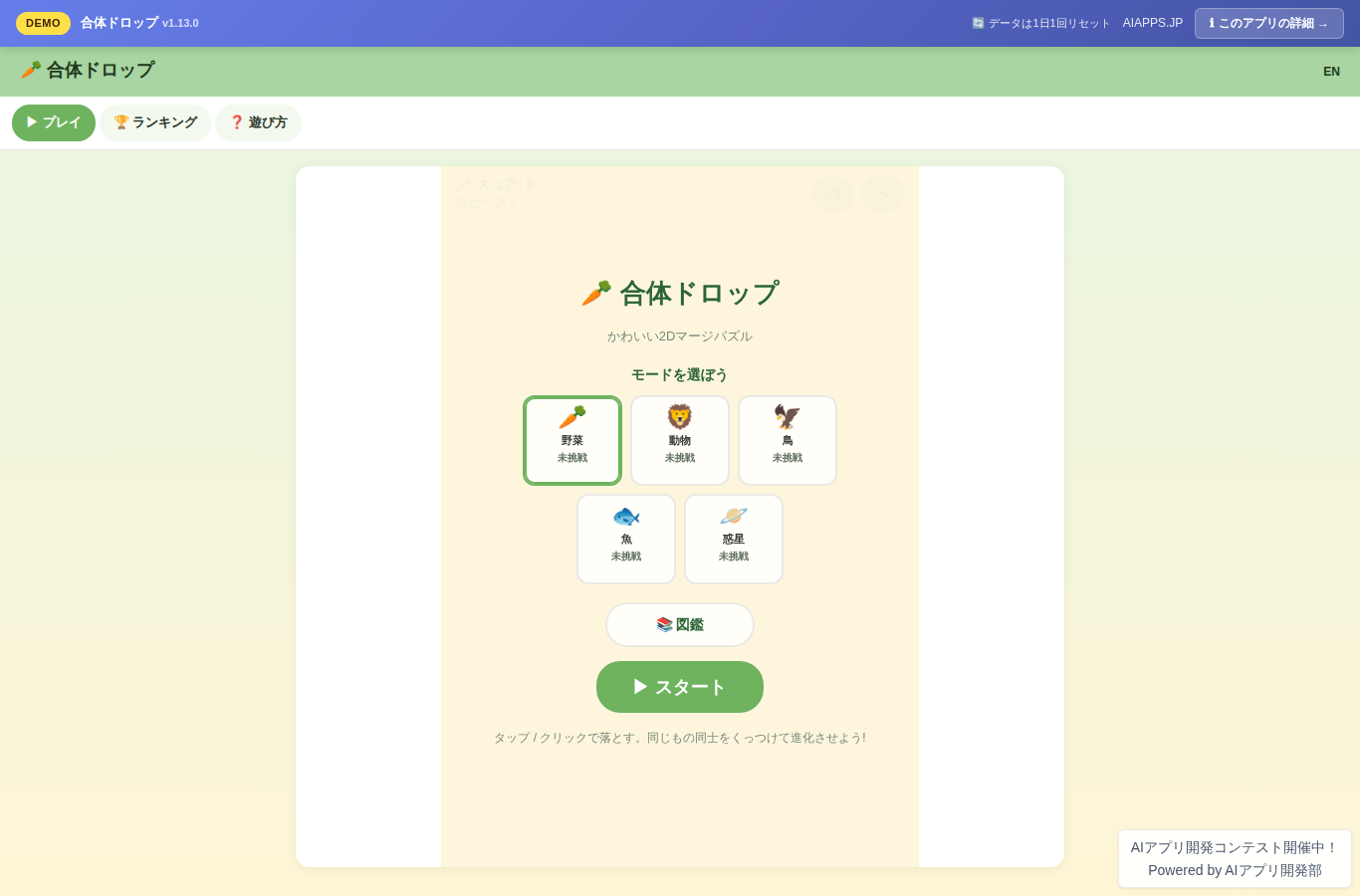
A 2D merge puzzle where you combine identical items to evolve them into bigger ones. Features five themed modes — vegetables, animals, birds, fish, and planets — each with its own separate ranking. Runs on HTML5 Canvas with full support for PC, smartphone, and tablet.
Key Features
- On game over, shows your today / yesterday / this week / this month / all-time ranks along with your top percentile based on the number of participants (v1.125.0)
- Switch UI text size across three levels — small, standard, and large — on the title, ranking, encyclopedia, help, and game over screens, saved on your device (v1.124.0)
- Light / dark / system-linked display switching across all screens, with the theme saved on your device (v1.123.0)
- On game over, compares your score against your previously saved personal best and shows either the new record or how far you were from it (v1.120.0)
- Play any mode directly from its encyclopedia page while checking your locally saved personal best (v1.119.0)
- The five mode icons on the game over screen show your device-saved personal bests by mode and language, plus your currently selected mode (v1.118.0)
- Switch between vegetables, animals, birds, fish, and planets from the round mode icons on the game over screen and replay instantly (v1.117.0)
- Fetches the latest today / this week / this month / all-time top scores when you replay and updates the display without reloading the page (v1.116.0)
- Replay and record scores as many times as you like from the game over screen without reloading the page, keeping your current mode, speed, sound, vibration, and language settings (v1.115.0)
- Choose from five themed modes — vegetables, animals, birds, fish, and planets — on the title screen (v1.6.0)
- Each mode has its own evolution chain and color theme, with the background color changing on selection
- The encyclopedia screen shows each theme's evolution chain, unlock status, stages remaining until unlock, unlock dates, and per-mode completion rate, and lets you share a full clear on X
- Simple controls: stack falling items inside the frame at the bottom of the screen
- Shows a confirmation if you try to leave the page by mistake after making at least one drop during a game (v1.79.0)
- Matching items evolve one stage larger when they touch
- Earn points with every evolution — the bigger the result, the higher the score
- Game over when items overflow the frame
- Per-mode daily rankings, date-specific rankings with a date picker and previous/next day navigation, JST Monday-start weekly rankings with previous/next week navigation, JST-based monthly rankings with a month picker and previous/next month navigation, and all-time rankings
- The mode cards on the title screen show today's participant count for each mode plus the top player and score for today, this week, this month, and all time (v1.112.0)
- The mode cards on the title screen show where your device-saved personal best would rank all-time (v1.81.0)
- Saves personal bests by mode and language on your device along with the JST achievement date, shown on the title, in-game, game over, and ranking screens (v1.102.0)
- Check your personal best for the selected mode on the ranking screen and compare it against the daily and all-time rankings (v1.28.0)
- Filter the ranking screen to show only your own records matching your saved player name (v1.46.0)
- Combine player name, own-records, score range, and evolution stage filters on the ranking screen, and reset all conditions at once (v1.103.0)
- Ranking filters and copy/CSV target settings are stored in the URL so they can be restored on reload or via a shared link (v1.100.0)
- Copy a URL containing your current ranking filters and view state with a single tap (v1.108.0)
- Copy or download as CSV only the filtered results currently shown on the ranking screen (v1.82.0)
- Load 50 more ranking entries at a time to browse and filter beyond 50th place (v1.88.0)
- Jump to your own rank matching your saved player name with a single tap on the ranking screen (v1.76.0)
- View your device-saved personal bests for all five modes in a collapsible list on the ranking screen and jump to each mode's ranking (v1.52.0)
- See the next and second-next falling items in the NEXT / NEXT 2 slots during play, making it easier to plan ahead (v1.58.0)
- Detects rapid consecutive evolutions as combos and displays them with animation on the Canvas (v1.14.0)
- Check your play time, total evolutions, and max combo on the game over screen (v1.15.0)
- Check your cumulative play count per mode for sessions that included a drop, on the title and game over screens (v1.89.0)
- Records total play time per mode for sessions that included a drop, viewable on the title and game over screens (v1.91.0)
- Check your average time per play by mode on the title and game over screens (v1.92.0)
- Saves your best combo by mode and language on your device, with new records and previous bests shown on the game over screen (v1.86.0)
- Copy your score, max evolution, and play summary as social-media-ready text from the game over screen (v1.16.0)
- Save a mode-themed result card image from the game over screen (v1.87.0)
- On supported smartphones, send the result card image directly to a sharing app from the game over screen (v1.101.0)
- Share your results and the top 5 of the selected ranking to X's post screen with a single tap (v1.71.0)
- Copy the top 5 entries of the selected mode and tab as shareable text from the ranking screen (v1.41.0)
- The ranking screen's "Specific Date" tab lets you pick any real date up to today from a date picker and move continuously to the previous or next day while keeping your filters and view state (v1.106.0)
- Added a JST Monday-start "This Week" tab to the ranking screen, with a date picker and previous/next week navigation (v1.110.0)
- See how active the JST calendar month has been on the ranking screen's "This Month" tab (v1.104.0)
- View your last 5 plays by mode and language plus a mini score trend graph on the game over screen (v1.65.0)
- See how your score and max evolution changed from your previous play right after game over (v1.63.0)
- Right after game over, see where your unsubmitted score would rank on the today, yesterday, this week, this month, and all-time rankings (v1.105.0)
- Switch drop speed between ⏩x1 / ⏩x1.5 / ⏩x2 on the title screen and during play (v1.19.0)
- Pause and resume during play, and return to the title from the pause screen without saving your score. Also pauses automatically when you switch tabs (v1.37.0)
- On supported browsers, keeps the screen awake during play and releases it automatically on pause, game over, or return to title (v1.75.0)
- Saves your JST-based consecutive play streak on your device; once it reaches two or more days, your current and longest streaks appear on the title screen, and your current streak is added to shared results (v1.84.0)
- Export and import a data transfer code from the title screen, and reset device-saved data such as personal bests, play history, and encyclopedia unlock status (v1.69.1)
- Enter a player name to submit your score — anyone can join in easily
- Supports PC mouse and keyboard controls as well as smartphone touch controls (responsive)
- On supported smartphones, provides haptic feedback on evolutions, combos, and game over, toggleable during play (v1.22.0)
- Sound effects play lightly via the Web Audio API, and the OFF setting persists on your next visit (v1.24.0)
- Gentle per-mode background music plays during the game, and the BGM OFF setting persists on your next visit (v1.24.0)
- Your record is highlighted in the rankings right after you submit your score (v1.25.0)
- Holds up to 10 scores on your device when they can't be sent due to connection issues, with pending counts, resend results, and manual resending available on the title screen (v1.96.0)
- Available in Japanese and English
- Saves the player name you last used when submitting a score on your device and auto-fills it on the next game over screen (v1.26.0)
- Download the top 50 entries of the selected mode and tab as a CSV from the ranking screen for analysis in Excel and similar tools (v1.64.0)
Setup Steps
- Create an account on AI App Lab (if you haven't)
- Download
installer.phpfrom your dashboard - Upload to your server's public directory and run it
- Enter API token → select this app → enter DB info → done
📚 Version History
Showing the current version only. See all versions (165) →
v1.135.5
Current
正当な語句「ばかり」「バカラ」「バカうけ」がプレイヤー名のNG語判定で誤って拒否される問題を修正しました。
🔒 Log in and a license are required to download